|
Input files
|
TaskDemo.MIN, TaskDemo.BAT, TaskDemo.PIN, TaskDemo.SCR
Task_Demo.zip
|
|
Description
|
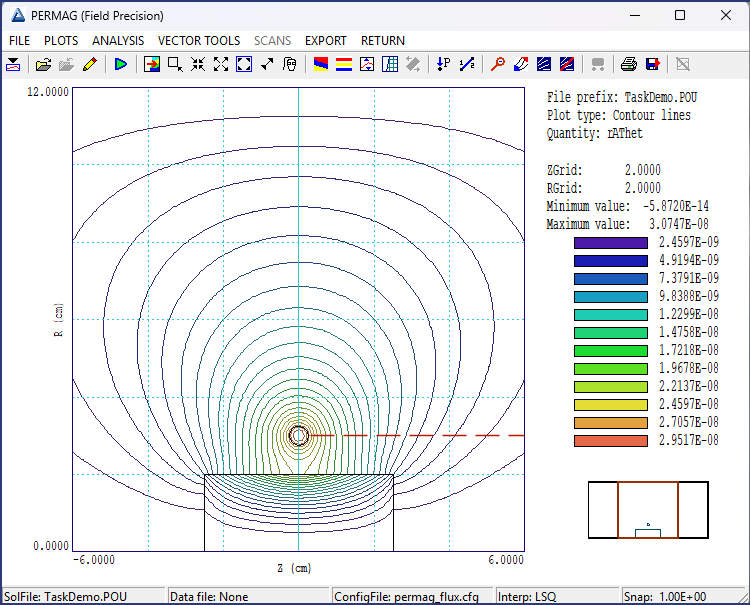
This example illustrates techniques for running automated tasks in fpcontroller.exe, the Field Precision program launcher. The term task refers to a Windows batch file that can be prepared with the Create task function in FPController or by using a text editor. The figure shows a test example, the geometry and lines of B for a 2D inductance calculation with Mesh and PerMag. A wire of radius 0.25 cm forms a loop of radius 3.0 cm. The loop, enclosed in a large air volume, carries a uniformly-distributed current of 1.0 A. A cylindrical object of radius 2.0 cm and length 5.0 cm can represent air or ferrite with MuR = 100.0. The goal is to perform the two calculations in the background and to list analysis results in a single data file.
The input file TaskDemo.BAT has the content
DEL TaskDemo.DAT
START /B /WAIT C:\fieldp/tricomp/mesh.exe TaskDemo
START /B /WAIT C:\fieldp/tricomp/permag.exe TaskDemo.PIN 1.000
START /B /WAIT C:\fieldp/tricomp/permag.exe TaskDemo.SCR
START /B /WAIT C:\fieldp/tricomp/permag.exe TaskDemo.PIN 100.000
START /B /WAIT C:\fieldp/tricomp/permag.exe TaskDemo.SCR
START /B /WAIT C:\fieldp\NOTIFY.EXE
IF EXIST TASKDEMO.ACTIVE ERASE TASKDEMO.ACTIVE
The two PerMag calculations open and append data to the file TaskDemo.DAT. The first command deletes any previous file with that name. The START batch command runs executable programs. The /B option indicates that the task should run in the background without opening a window and the /WAIT option specifies that the batch procedure should wait for an operation to complete before running the next one. The call to Mesh generates the file TaskDemo.MOU from information in the input file TaskDemo.MIN. The next statement generates a magnetic field solution using information in TaskDemo.MOU and TaskDemo.PIN. Note that a suffix is required for the input file because PerMag has two functions: the PIN suffix calls for a numerical solution and the SCR suffix indicates analysis of the solution. The file TaskDemo.PIN contains the line
* Region 3: INCLUSION
Mu(3) =  %1
If there is a third parameter in the START command, its value will be substituted for the symbol %1. Therefore, the batch file carries out two calculations and analyses for MuR = 1.0 and 100.0.
In response to the fourth line, PerMag carries out an analysis of the current solution controlled by the script file TaskDemo.SCR with the content:
INPUT TaskDemo.POU
OUTPUT TaskDemo.DAT Append
CONFIGURATION C:\fieldp\tricomp\permag_flux.cfg
VOLUMEINT
LINEINT 12.00  3.00  0.25 3.00
ENDFILE
The Append parameter in the OUTPUT command specifies that all results should be recorded in a single data file. The LINEINT command evaluates quantities over the specified surface (the dashed red line in the figure). The CONFIGURATION command ensures that magnetic flux is included in surface integrals.
|
|
Results
|
Unzip the input files to a working directory, run FPController and set Data folder to that directory. In FPController, click the Run task button and choose TaskDemo.BAT. The programs run silently and take only a few second to produce the file TaskDemo.DAT with the following results:
Results MuR = 1.0
  Global integral minus loop energy:   4.6618E-8 J
  Inductance: 9.3235E-8 H
  Normal integral: 9.4296E-8 H

Results MuR = 100.0
  Global integral minus loop energy:   8.5712E-8 J
  Inductance: 1.7142E-7 H
  Normal integral: 1.7167E-7
The VOLUMEINT and LINEINT methods yield almost the same values for the self-inductance. The presence of the ferrite increases the inductance by a factor of 1.83.
|
|
Comments
|
The Create task function in FPController can speed the generation of batch files and the Create script function in the analysis menu of PerMag and other solution programs can help in the preparation of files like TaskDemo.BAT and TaskDemo.SCR. Nonetheless, setting up automatic runs takes some effort. This example with only two parameter variations serves as a template. Automatic operation can save consider time and redundant operations in scans with a large number of parameter values. Furthermore, background operation allows other computer activities to be carried out during a run.
Links to related examples:
Self inductance of a wire loop or bundle at low frequency
Autonomous calculations with Perl
|